
I’ve been making Magento websites for a good while now, but encountered the issue of new products having a main product image but no thumbnail image on landers. I could edit these individually by selecting the radio buttons on ‘Manage Products > Select Product > Images’ but wanted to do this in bulk, having just uploaded 1000 new products for a furniture site.
There didn’t seem to be any options when importing/exporting, so after a bit of searching I found some sql to fix the issue.
First of all you need to check that the ids targeted are correct for your install, the defaults for IMAGE, SMALL_IMAGE and THUMBNAIL attribute ids are 74, 75, 76. These can be found in the ‘eav_attribute‘ table in your Magento install using phpMyAdmin.
You might need to increase the number of rows shown, to view these entries.
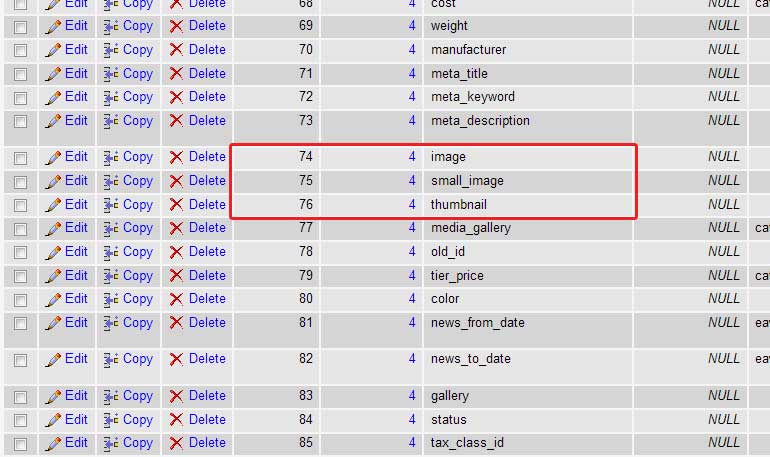
Then, after saving a backup, run the following sql within the sql panel of your database;
 UPDATE catalog_product_entity_media_gallery AS mg,

catalog_product_entity_media_gallery_value AS mgv,

catalog_product_entity_varchar AS ev

SET ev.value = mg.value

WHERE  mg.value_id = mgv.value_id

AND mg.entity_id = ev.entity_id

AND ev.attribute_id IN (74, 75, 76)

AND mgv.position = 1;
It worked without any issues for me on Magento v. 1.4.1.0. Thanks to Magento’s forum and StackOverflow.











You, my friend, are a GENIUS!
3 days im looking for this, and every other person is offering PHP scripts, SSH etc…
you were able to help me in such a clear way, that your post should be ranked first on google for people who need this help.
I owe you a pint of beer when you visit NYC.
Cheers. 🙂
Always glad to help 😉
Awesome, we had a couple of summerkids helping us with products that forgot to check the boxes. With the result that over 1000 random products only had base image.
Thanks!
So my attribute id’s are 112,113, 114. I tried changing out your AND ev.attribute_id IN (74, 75, 76) with AND ev.attribute_id IN (112, 113, 114) with no apparant results. Can I not modify in that manner?